June 17th, 2026
Thank you for using LISMOA.
Here's a summary of recent updates. This release ships three major features — Reimbursement and Inventory Loss on the P/L, FBA Storage Fee viewing in LISMOA, and Amazon Ads token expiry alerts — alongside many improvements and bug fixes.
New 補填 (Reimbursement) and 在庫ロス (Inventory Loss) columns on the P/L, eliminating expense double-counting (#491)
We added two dedicated columns to the P/L on the 実績 (Performance) page: 補填 (Reimbursement) — the gross refund amount from Amazon FBA — and 在庫ロス (Inventory Loss) — the purchase cost of inventory lost to damage or returns. These were previously mixed into general expenses, obscuring the true profit structure.
What the new columns mean
補填 — The gross refund amount from FBA reimbursements (warehouse damage, warehouse loss, customer returns, etc.). It's counted as-is regardless of whether it's tied to a specific order, so it matches the 補填額 (Reimbursement Amount) total on the Reimbursements page. In the Total Cost calculation, it works to reduce cost.
在庫ロス — The purchase cost of inventory lost to warehouse damage, warehouse loss, or damaged customer returns. In the Total Cost calculation, it works to increase cost.
Σ コスト合計 (Total Cost) formula
原価 + 注文連動費 + 販促費 + 補填 + 在庫ロス + その他経費
補填, 在庫ロス, and その他経費 each carry their own sign internally (補填 reduces cost; 在庫ロス adds to cost).
Enhancements on the Reimbursements page
Added 仕入単価 / 原価合計 / 収支 (Unit Cost / Total Cost / Profit) columns. Click a 仕入単価 cell to open a side panel where you can edit it inline, or auto-apply the product's default unit cost.
Added a confirmation status badge and filter with three states: 未確認 (Unconfirmed) / 留保中 (Pending) / 支払い実行済み (Confirmed). See at a glance where Amazon is in the refund settlement process.
Added 収支 / 確認済み件数 / 確認済み金額 / 原価合計 (Profit / Confirmed Count / Confirmed Amount / Total Cost) summary cards.
Note on 在庫ロス aggregation timing
在庫ロス is aggregated on a different basis than other P/L columns:
Customer returns are counted on the return arrival date (返品日)
Warehouse damage / loss is counted on the approval date (処理の承認日)
This may differ from the order date basis used for most other columns.
View 在庫保管手数料 (FBA Storage Fees) directly in LISMOA (#453)
FBA storage fees, previously only viewable in Amazon Seller Central, can now be browsed in LISMOA through a new tab on the Inventory page.
How to access
From the sidebar, go to フルフィルメント (Fulfillment) > 在庫 (Inventory). You'll see two tabs at the top:
現在庫 (Current Inventory)
在庫保管手数料 (Storage Fees)
Click the 在庫保管手数料 tab to see storage fee data per product (ASIN × Fulfillment Center) for the selected month.
Key columns
Through column visibility settings, you can also display analytical metrics such as 在庫保管使用率, 平均日次在庫数, 30日超平均在庫, 30日超容積 (storage utilization, avg daily inventory, avg inventory over 30 days, volume over 30 days).
Date selection
Use the month picker at the top right to go back to past months as needed. Defaults to the previous month (the 1st through end of last month).
Summary cards
By default, six cards are shown at the top: 件数, 対象商品数, 平均在庫保管手数料, 合計保管料, 平均日次在庫数, 平均日次注文数 (Count, Number of Products, Avg Storage Fee, Total Storage Fee, Avg Daily Inventory, Avg Daily Orders). These cards can be swapped out for other metrics via card settings.
Data refresh
Storage fee data is fetched daily for the prior month and reflected in LISMOA as soon as Amazon finalizes the data. The current month's data is not available — this is an Amazon API constraint, as month-level data is only finalized after the month ends.
Get advance notice before Amazon Ads token expiry (#649)
Due to an Amazon Ads API policy change, ad accounts connected on or after June 30, 2026 will have their authentication token expire 365 days after connection. When the token expires, ad data fetching stops automatically. To prevent disruption, LISMOA will proactively notify you via email, in-app banner, and the Settings page so you can re-authenticate in time. When you see the banner or receive the email, head to the Settings page to re-connect the account.
About accounts connected before June 30, 2026
Ad accounts connected before June 30, 2026 are grandfathered by Amazon and will not expire for the time being. The 365-day countdown only starts once they're re-connected on or after that date.
Improvements
Added a 在庫総額 (Stock Value) column and summary card to the 現在庫 (Current Inventory) page (#589)
Bulk CSV cost updates can now be done from the SKU page (Product / SKU CSV dialogs are unified under tabs) (#701)
Reworked 在庫ロス aggregation into a two-layer model so that inventory loss from damaged customer returns is correctly reflected on the P/L (#713 +1 more)
Skipped alerts for ASINs not registered in LISMOA, reducing unnecessary notifications (#628)
Unified hover styling for in-table links and tooltips across the app (#473)
Bug Fixes
Fixed an issue where %-based columns (ACOS, ROAS, etc.) couldn't be sorted on the Ads pages (SP / SB / SD / DSP) (#727)
Fixed an issue where filter values were not saved when saving a preset (ad pages and 10 other pages) (#755 +1 more)
Fixed a 403 "Access Denied" error when creating new presets on Monitor-plan accounts (#766)
Fixed an issue where CSV bulk updates silently ignored columns with mismatched header names, leaving the update at 0 rows with no error (added immediate feedback after upload) (#652)
Fixed an issue where partial cancellations could cause incorrect cost and profit calculations (#667)
Fixed an issue where "¥Infinity" was displayed in the shipping unit cost column for order items (#770)
Fixed an issue where the Amazon expense 当月日割り (Prorate to Current Month) setting was overwritten by the next batch with 発生日 (Date of Occurrence) (#776)
Fixed an issue where the update-frequency tooltip on the dashboard incorrectly showed "every 1 hour" on the Standard plan (#660)
Fixed an issue where DB lock contention during FBA reimbursement report fetching could cause reimbursement data to be missed (#810)
If you have any questions, please feel free to contact our support team. Thank you for your continued support of LISMOA.
June 1st, 2026
New
Improved
Fixed
Thank you for using LISMOA.
Here's a summary of updates included in LISMOA v1.0.0 (released on May 26, 2026).
New Current Stock Page (/stocks/fba) (#311 +5 more)
A new 現在庫 (Current Stock) page is now available, letting you view and analyze your FBA inventory state as a point-in-time snapshot. Access it from フルフィルメント (Fulfillment) > 現在庫 (Current Stock) in the sidebar.
Use the date picker in the upper right to select the snapshot date. The page shows all SKUs' on-hand quantities, days-of-supply estimates, excess inventory, and Amazon's recommended actions for that point in time. The date picker offers presets: 本日 (Today), 昨日 (Yesterday), 1週間前 (1 Week Ago), 前月末 (End of Last Month), 前々月末 (End of Two Months Ago), 前四半期末 (End of Last Quarter), and 昨年末 (End of Last Year).
Summary Cards
Summary cards at the top of the page show aggregate values across all SKUs — total on-hand quantities (販売可能 / Available, 入出荷作業中 / In Working, 販売不可 / Unsellable, 納品中 / Inbound, Σ FBA在庫 / Σ FBA Stock, etc.), the average days-of-supply (five variants), and estimated storage fees. Count units are shown as "SKU".
Default Columns
The default view shows 21 columns (you can hide or add columns via the column visibility toggle):
商品情報 (Product Info): 商品 (Product) / FNSKU / ストア (Store) / 販売価格 (Sale Price) / 仕入単価[商品] (Purchase Price [Product])
在庫数 (On-hand Quantities): 納品中 (Inbound) / 販売可能 (Available) / 入出荷作業中 (In Working) / Σ FBA在庫 (Σ FBA Stock) / 販売不可 (Unsellable) / 返送/所有権の放棄処理中 (Pending Removal)
在庫効率 (Inventory Efficiency): 在庫年齢 (Inventory Age) / 在庫日数[需要予測] (Days of Supply [Forecast]) / 在庫残週数[過去30日実績] (Weeks of Cover [Past 30 Days]) / 余剰在庫[推定] (Estimated Excess Inventory)
販売速度 (Sales Velocity): 販売数 (Units Shipped) / 出荷売上 (Sales Shipped)
Amazon推奨 (Amazon Recommendations): 注意 (Alert) / 推奨アクション (Recommended Action) / 推奨納品 (Recommended Ship-In) / 保管手数料 見積り[30日] (Estimated Storage Cost [30 Days])
Five Variants of "Days of Supply"
Five days-of-supply columns are available as optional columns to help you analyze inventory from different angles:
在庫日数 [需要予測] (Days of Supply [Forecast]) — Calculated by Amazon's demand forecast model, factoring in seasonality and trends
在庫日数 [需要予測・入荷待ち含む] (Days of Supply [Forecast incl. Inbound]) — Forecast-based value, plus inbound quantities
在庫日数 [過去ペース採用値] (Days of Supply [Historical Adopted]) — The value Amazon adopts as the representative figure (also used for the Low Inventory Level Fee determination)
在庫日数 [過去30日ペース] (Days of Supply [Past 30 Days]) — Based on the past 30 days of actual sales velocity
在庫日数 [過去90日ペース] (Days of Supply [Past 90 Days]) — Based on the past 90 days of actual sales velocity
"Low Inventory Level" Column (optional)
The Low Inventory Level column shows the fee status as one of three badges: 免除 (Exempted), 適用中 (Applied), or 対象外 (Not Applicable). This lets you check whether a product is subject to — or exempted from — Amazon's Low Inventory Level Fee (charged on products whose available inventory drops below a certain threshold).
Filters and Search
Keyword search — Searches across product name, SKU, and ASIN
ストア (Store) — Multi-select
ブランド (Brand) — Multi-select with an Include / Exclude mode toggle
Inline Editing of Purchase Price
Click the pencil icon in the 仕入単価[商品] (Purchase Price [Product]) column to edit the purchase price directly in the row.
CSV Export
The "CSVダウンロード" (CSV Download) button in the upper right exports the current view (reflecting the selected date and filters) as a CSV.
New SP Search Terms Page (#208 +7 more)
A new SP検索用語ページ (SP Search Terms Page) is now available for analyzing Sponsored Products (SP) search term performance. Access it from マーケティング (Marketing) > スポンサープロダクト広告 (Sponsored Products) in the sidebar, then switch to the 検索用語 (Search Terms) tab (keyboard shortcut: S).
A "search term" is the actual query that a customer entered on Amazon. This page lets you see, row by row, which targeting (Manual / Auto) and which match-type keyword triggered the ad for each search query. This is useful for finding new keyword candidates, building negative keyword lists, optimizing bids, and other ad-performance tuning decisions.
Since the page lists every search term across your entire account, we recommend filtering first — by campaign, ad group, or keyword type — before diving into analysis.
Three-line "Keyword" Column
The Keyword column cell is displayed in three lines:
Keyword string — A manually configured keyword, a product/category targeting expression, or an auto-targeting type (ほぼ一致 / Close Match, おおまか一致 / Loose Match, 補完商品 / Complements, 代替商品 / Substitutes)
Match type — 部分一致 (Broad) / フレーズ一致 (Phrase) / 完全一致 (Exact) / 商品ターゲティング (Product Targeting) / オートターゲティング (Auto Targeting)
Keyword status — 有効 (Enabled) / 一時停止 (Paused) / アーカイブ済み (Archived)
Filters
Six filters are available: ストア (Store), ポートフォリオ (Portfolio, with Include/Exclude toggle), ステータス (Status, in three groups for Keyword / Ad Group / Campaign), キーワードタイプ (Keyword Type, see below), キャンペーン (Campaign), and 広告グループ (Ad Group). The search box queries across search term, keyword, ad group name, and campaign name.
The キーワードタイプ (Keyword Type) filter is three-tier:
Manual Targeting > Keyword Targeting > Exact / Phrase / Broad
Manual Targeting > Product Targeting > Product Targeting
Auto Targeting > Targeting Group > Close Match / Loose Match / Substitutes / Complements
Default Preset
On first access, an 18-column default preset is automatically applied. The default filter is キャンペーンステータス: 有効 (Campaign Status: Enabled), and the default sort is 広告費(税抜)降順 (Ad Spend [Tax Excluded], Descending).
The "CSVダウンロード" (CSV Download) button exports the current filtered view as a CSV.
New SB Search Terms Page (#218 +7 more)
A new SB検索用語ページ (SB Search Terms Page) is now available for analyzing Sponsored Brands (SB) search term performance. Access it from マーケティング (Marketing) > スポンサーブランド広告 (Sponsored Brands) in the sidebar, then switch to the 検索用語 (Search Terms) tab (keyboard shortcut: S).
The basic usage, column layout, and filter structure are the same as the SP Search Terms Page above. You can see which keyword triggered the ad for each search term, along with the targeting, match type, and delivery status. As with SP, we recommend filtering by campaign or ad group before analyzing.
Key differences from the SP Search Terms Page:
Keyword Type is limited to three options: 部分一致 (Broad) / フレーズ一致 (Phrase) / 完全一致 (Exact) (SB does not support Auto Targeting or Product Targeting)
Video metrics columns (populated only for SB Video campaigns) — 5-second views, 5-second view rate, complete views, 25% / 50% / 75% view counts, and unmute counts — can be optionally displayed
The default preset has 17 columns (vs. 18 for SP)
The "CSVダウンロード" (CSV Download) button exports the current filtered view as a CSV.
Unified Performance Page (Product Performance Page Merged into Performance) (#212 +9 more)
The previously separate 実績 (Performance) and 商品実績 (Product Performance) pages have been unified. You can now view both team-wide aggregates and individual product performance from a single page under P/L > 実績 (Performance) in the sidebar.
Click the product selector at the top of the page (default state: "すべての商品" (All Products)), or use the Cmd/Ctrl + K shortcut to open the search dialog. Search by product name, SKU, or ASIN to switch the focused product. Recently viewed products (up to 10) are automatically saved and can be re-selected in one click from the top of the dialog.
As before, clicking a product title within any table navigates to the Performance page with that product pre-selected.
The 日別 (Daily) / 週別 (Weekly) / 月別 (Monthly) / 曜日別 (By Weekday) tabs preserve the product filter when you switch between them
When a product is selected, the summary cards, combined chart, and table all switch to that product's data
In addition, two columns that previously only existed on the Product Performance page have been added to the Performance page (hidden by default — enable via the column visibility toggle):
セールスランク (ルート) / Sales Rank (Root) — The product's current Amazon Best Seller Rank in its top-level category
セールスランク (リーフ) / Sales Rank (Leaf) — The product's current Amazon Best Seller Rank in its leaf-level category
On the 週別 (Weekly) and 月別 (Monthly) tabs, the values shown are averages over the selected period. When no product is selected (i.e., "All Products"), the Sales Rank values are not displayed.
The old URLs (/product/daily, /product/weekly, /product/monthly) automatically redirect to the new URLs (/overview/daily, /overview/weekly, /overview/monthly), so existing bookmarks and external links continue to work.
CSV export has also been unified into six types: overview_daily, overview_weekly, overview_monthly, overview_by_weekday, overview_stores, overview_hourly. When you export with a product selected, the CSV reflects that product's data.
The "商品実績" (Product Performance) item has been removed from the sidebar. Presets previously created on the Product Performance page are automatically migrated to the Performance page.
Other New Features
Added "返金 [売上]" (Refund [Sales]) and "グロス [売上]" (Gross [Sales]) columns to the Performance, Product Performance, and CSV outputs (#149 +2 more)
Added a "返品" (Returns) column (FBA return count) to the Performance, Products, and SKU pages, with a tooltip link to the Returns page for details (#206 +1 more)
Added latest snapshot columns (listing date, sale price, fulfillment method, etc.) to the Products and SKU pages (#209 +5 more)
Redesigned the product selector on the Product Performance page as a searchable combobox — supports product name / SKU / ASIN search, recently viewed products, and the
Cmd+Kshortcut (#210 +6 more)Added separate Email and Password change sections to the Profile settings page, each with independent action flows (#233 +2 more)
Overhauled the プラン (Plan) page usage display: progress bars now show usage for order count, active products, store connections, and member seats. A plan-tier indicator compares data update frequency, retention period, and preset count against higher tiers. A new "過去データ取得オプション(24ヶ月)" (Extended Historical Data [24 Months]) card has also been added (#190 +4 more)
Improvements
Unified the product cell across all tables to show ASIN and SKU consistently, and added a Line Item ID column (#155 +1 more)
Changed the "missing expense" warning icon in the profit summary card to a distinct shape (round) so it can be distinguished from data error icons, and extended it to the Orders and Order Items pages (#162 +1 more)
Hid internal IDs from the Campaign and Ad Group columns on the ads pages to improve readability (#165)
Added campaign and ad-type filters to SP/SB/SD ad pages. Campaign candidates are grouped by Enabled / Paused / Archived, and ad group selection now has campaign-linked control with color dots (#151 +2 more)
Added an Exclude mode to multi-select filters. Switched the toggle UI to a Switch component, with dark mode support (#273 +3 more)
Added 本日 (Today) and 昨日 (Yesterday) shortcuts to the period preset on the Order Items page (#205)
Renamed the 種類 (Type) column to ページ (Page) on the Downloads page, with mapping cleanup and a relocated status column (#334)
Suppressed the alert skeleton when no alerts exist on the dashboard, eliminating a flash of empty state during load (#250)
Added count links to the Campaign and Ad Group columns on the ads pages, with name-click drill-down navigation to the layer below (#242 +4 more)
Show a "一時停止" (Suspended) badge and a re-link button when the Amazon connection has expired (#237)
Resolved 8 implementation gaps on the pricing plan limit table — Free / Light plan restrictions are now correctly enforced for CSV, alerts, presets, etc., including the Free plan locking the alert configuration UI (#325 +3 more)
Initial connection flow now requests all available Amazon reports at once, so FBA returns, inventory, and other data are populated faster after connection (#264)
Widened dropdown filters and added a full-text Tooltip when names are truncated, making long campaign names easier to verify (#471)
Added a read-out and update flow for product-level defaults (purchase unit price, shipping cost, auto-allocation) in the order item edit sheet (#480 +1 more)
Cleaned up the background processing progress bar display in the sidebar (#337)
Improved the summary card layout to fold into 2 columns at smaller widths, preventing number overflow (#472 +2 more)
Made the SP/SB/SD ad list "master-based" — ads, ad groups, and campaigns with no metrics in the selected period are now still listed (#445)
Bug Fixes
Fixed lag in filter operations on the Products and Order Items pages (#243)
Fixed an issue where the selector did not reflect the product specified in the URL on the Ad Performance and Product Performance pages (#274)
Fixed the restricted behavior for pending members (re-send invitation and account creation via invitation link) (#299)
Fixed an issue where suffix characters such as "税込]" in table headers were truncated and unreadable (#271)
Fixed an issue where parent-ASIN keyword search returned 0 for the header card values on the Products page (#289)
Fixed an issue where Sales Rank on the Product Performance page was the same value across the entire period (#283 +2 more)
Fixed the duplicate-email error display and list refresh in member invitations (#336)
Fixed an issue where the ad spend badge always showed "Tax Included" on summary cards across the ads pages (#288)
Fixed an issue where the summary card label showed "quantity" in English on the Order Items page (#335)
Fixed an issue where the browser password manager autofill did not appear when focusing the email field on the login page (#463)
Localized the email-send failure error message into Japanese and added re-try guidance during new user registration (#365)
Fixed an issue where the store filter did not apply on the Monthly tab of the Performance page. Store filtering is now preserved across tab switches and reflected in the URL (#384 +5 more)
Fixed an issue where the Settings page did not auto-refresh after completing an ad account link, leaving the link button visible (#404 +1 more)
Fixed an issue where keyword filtering was not applied to CSV exports on the Products page (#411 +1 more)
Fixed an issue where deselecting one item in a multi-select filter did not apply the change (#518)
Fixed an issue where authentication remained stuck on "Verifying..." after the first login of a browser session, preventing automatic navigation to the dashboard (#462)
Fixed a server-side time bug where the "昨日" (Yesterday) preset was applied as today (#460)
Fixed an issue where ASIN filtering was cleared when a preset was selected or cleared on the Ad Performance page (#521)
Fixed extreme slowness on the Products list page under certain conditions (#257)
Fixed the initial fetch range for FBA Customer Returns to look back up to 185 days when newly connecting a store (#261)
Fixed an issue where CSV imports often failed when uploading several files in quick succession (#385)
Fixed the initial ad report fetch on new store connection to look back up to the per-ad-type maximum (SP=95 days / SD=65 days / SB=60 days) (#420)
Auto-recovers when Amazon's AMS subscription changes cause ad data ingestion to stop (#435)
Fixed an issue where the order data fetch batch stopped right after a new store connection (#438)
If you have any questions, please feel free to contact our support team. Thank you for your continued support of LISMOA.
May 13th, 2026
New
Improved
Fixed
Thank you for using LISMOA.
Here's a summary of recent updates.
New FBA Returns Report Page (#19)
A new "返品" (Returns) page now lets you view and analyze FBA return data. Access it from the left sidebar under フルフィルメント (Fulfillment) > 返品 (Returns).
The top of the page displays four summary cards for an at-a-glance view of returns:
件数 (Total Count) — Total number of returns in the selected period
件数 / 販売可能 (Sellable Count) — Returns that came back in re-sellable condition
件数 / 販売不可 (Unsellable Count) — Returns that cannot be re-sold (e.g., damaged)
数量 (Quantity) — Total quantity of returned items
The default columns are:
返品商品 (Return Item) — Product image, name, ASIN/SKU, and a disposition badge (Sellable=green / Damaged variants=red / Defective and Expired=gray)
注文 (Order) — Amazon Order ID (links to the order detail page in Seller Central) and return date/time
ストア (Store) — Store name and marketplace
数量 (Quantity) — Returned quantity
返品理由 (Return Reason) — The reason provided by Amazon, displayed in Japanese
FC — Fulfillment center that received the return
FNSKU, LP番号 (LP Number), and 顧客コメント (Customer Comment) can be enabled via the column visibility toggle.
The page provides four filters: ストア (Store), 処理状況 (Disposition), 返品理由 (Return Reason), and FC. The disposition filter has six options: Sellable, Damaged, Customer Damaged, Defective, Carrier Damaged, and Expired. The search box queries across product name, ASIN, SKU, FNSKU, and Order ID.
The "CSVダウンロード" (CSV Download) button in the upper right exports the current filtered view as a 13-column CSV.
Return data is fetched periodically from Amazon's FBA Customer Returns Report, so historical returns are also available for analysis.
Save Period and Sort Order in View Presets (#84, #85)
View presets — available across all 16 pages (Performance, Orders, Products, Expenses, Ads, Stocks, etc.) — now support two additional settings. This lets you save a complete analytical view (Period + Filters + Columns + Sort) and switch between them with one click.
The newly added settings:
期間 (Period) — Choose from up to 19 preset ranges per page type (Today, Yesterday, This Week, Last Week, This Month, Last Month, This Quarter, Last Quarter, Last 30 days, Last 90 days, Last 12 months, etc.). Selecting "指定しない" (None) falls back to the default range for that page, as before.
並び替え (Sort Order) — Select a sort column from the visible columns and toggle between 昇順 (Ascending) and 降順 (Descending).
To configure:
Open the "プリセット" (Preset) selector in the filter bar of any page
Click "新規作成" (New) — or, to update an existing preset, open the three-dot menu next to it and select "編集" (Edit)
Set the preset name, 期間 (Period), 並び替え (Sort Order), filters, and column visibility in the side sheet
Click "保存" (Save) to confirm
Toggling "デフォルトとして設定" (Set as Default) automatically applies the preset the next time you open that page. Presets are shared across team members.
Improvements
Unified mobile filter and menu interactions with Drawer layout (#1)
Added empty state message when no data is present (#16)
Added PWA support for home screen installation (hidden address bar, app icon, app name) (#26)
Made Amazon expense accounting method (date of occurrence / pro-rata) editable (#33)
Improved performance on Orders and Products pages (#41)
Differentiated empty states between "not connected" and "no data" (#58)
Added ASIN/SKU/FNSKU display in return item cells (#77)
Added hover tooltips explaining why fields are disabled during data fetching (#81)
Enabled invited members to join via Google login (#82)
Optimized advertising report fetch range to match attribution settlement timing (#83)
Improved background process completion UI (green bar, completed label, close button) (#98)
Improved mobile summary cards with no-scroll grid layout (#99)
Improved readability of table metric and column names on mobile (#107)
Added cause code, severity, and detail messages to listing issue alerts (#132)
Unified Subscribe & Save page summary cards with the customizable format (#133)
Fixed sign and recalculation scope of Amazon expense pro-rata calculation (#153)
Refined column, filter, and sort configuration on the FBA Returns page (#176)
Bug Fixes
Switched total cost chart to line chart and fixed loading layout issues (#3)
Fixed theme settings being reset on logout (#22)
Fixed in-table chart tooltips not following the mouse cursor (#25)
Fixed monthly/weekly sort not working on advertising performance pages (#37)
Improved password strength error message (#45)
Fixed batch processing halting under certain conditions (#76)
Fixed multiple display issues in the initial sync progress bar (#87)
Fixed sort settings not applied when selecting a preset (#88)
Fixed data duplication errors during ad report import (#96)
Fixed background process progress bar freezing, disappearing, or halting (#97)
Fixed wrong account token being overwritten during ad account reconnection (#100)
Added automatic detection of ad API authentication expiration (#101)
Fixed integer overflow during order data import (#104)
Fixed parameters being lost when fetching subsequent order pages (#106)
Fixed listing count and average parent product count being averaged incorrectly across multiple stores (#110)
Fixed empty presets being saved when preset creation partially failed (#112)
Fixed duplicate same-date data points appearing in product list sales charts (#120)
Fixed NULL errors for orders missing currency information (#147)
Fixed double-counted tax on advertising costs in CSV downloads (#158)
Fixed shipping cost filter timeout on the Products page (#196)
Applied the same shipping cost filter SQL fix to other pages (#197)
Fixed CTA navigation for the missing shipping cost alert (#198)
Aligned missing shipping cost alert criteria with data fetch timing (#199)
Unified missing shipping cost alert criteria between batch and API logic (#200)
Fixed cost-per-unit alert CTA to navigate directly to the correct page (#201)
If you have any questions, please feel free to contact our support team. Thank you for choosing LISMOA.
April 13th, 2026
New
Improved
Fixed
Thank you for using LISMOA.
Here's a summary of recent updates.
Manual Expense Entry & Editing (#838)
You can now manually add expenses from the Expenses page using the "経費を追加" (Add Expense) button on the right side of the filter bar.
Clicking it opens a side panel where you can enter the following details:
Date — Specify the date and time of the expense
Expense Type — Select from existing types or create a new one on the spot
Expense Name — Auto-filled when you select an expense type (can be manually changed)
Amount — Supports JPY, USD, EUR, and GBP. Negative values are recorded as refunds or returns
Allocation — Choose to allocate the expense to an entire store or to a specific product
Accounting Method — Record the full amount on the date of occurrence, or spread it across the month on a daily pro-rata basis
Manually added expenses are marked with a "マニュアル" (Manual) badge in the Source column, and can be edited or deleted from the three-dot menu.
You can also manage expense types from Settings > 経費タイプ (Expense Types), where you can add, edit, archive, or delete types. Drag-and-drop reordering is supported. Each type can have a default expense name that auto-fills when adding a new expense.
Use this feature to include costs outside of Amazon — such as outsourcing fees and tool subscriptions — for more accurate profit calculations.
3 New Alert Types Added (Beta) (#872)
Three new notification types have been added to the Alerts feature. Enable them from Settings > アラート (Alerts).
Product Catalog - Brand Detects and notifies you once per day when changes are made to the title, images, bullet points, or description of your brand-registered products. You can select which items to monitor individually.
Product Type - Brand Notifies you when the product type of a brand-registered product is changed.
Ad Budget Usage Notifies you when an advertising campaign's budget consumption reaches your configured threshold (50%–100%). Helps prevent missed opportunities due to budget depletion.
Notification channels can be configured from Settings > アラート送信先 (Alert Destinations) — Email, Slack, or Chatwork.
The Alerts feature is currently available as a beta.
Weekday & Store Tabs on the Performance Page (#834)
Two new tabs — "曜日" (Weekday) and "ストア" (Store) — have been added to the Performance page (P/L > 実績).
Weekday tab — View aggregated metrics (sales, orders, etc.) by day of the week (Monday–Sunday). Useful for identifying daily sales trends
Store tab — Compare performance across your store accounts. Ideal for sellers managing multiple stores
Both tabs display the same metrics as the existing Daily, Weekly, and Monthly tabs, with full support for column visibility toggles and CSV export.
Other New Features
Added referral performance display to the Referral Program settings page (#822)
Improvements
Added summary cards to the Transactions page (#881)
Redesigned summary cards on the Expenses page (#882)
Added missing cost warning icon to the profit counter (#877)
Added brand product catalog change alert (#864)
Improved alert layout for mobile screens (#867)
Redesigned column layout on the Transactions table (#849)
Added "Details" filter to the Transactions page (#857)
Added shipping columns, shipping level column, and shipping filter to the Order Items page (#837)
Added portfolio column and filter to SP/SB/SD ad pages (#832)
Added table row count metric to summary cards (#833)
Made the metric selector on summary cards mobile-friendly (#862)
Improved calendar picker to use Drawer on mobile (#871)
Fixed missing icons on summary cards and aligned with CSV definitions (#876)
Unified discount and chargeback column names to match spec (#870)
Hidden Y-axis on charts for mobile screens (#861)
Made summary card loading skeletons mobile-friendly (#860)
Overhauled in-table link navigation (#845)
Improved dashboard sales trend graph layout (#844)
Switched large numbers on summary cards to Japanese unit notation (万/億) (#843)
Updated settings page navigation layout (#830)
Limited review request timing to 5–30 days (#836)
Restructured dashboard layout (#835)
Improved calendar popover display on mobile (#825)
Bug Fixes
Fixed search box tooltip text on the Expenses page (#883)
Fixed alert CTA button navigation (#875)
Fixed dashboard alert display on mobile (#874)
Fixed plan change proceeding without credit card registration (#869)
Fixed Google login not showing account selection screen (#868)
Fixed dashboard KPI card title wrapping (#865)
Fixed default date range using UTC instead of JST (#873)
Fixed store selection being ignored during preset application (#879)
Applied a security-related fix (#858)
Unified Subscribe & Save status badge labels (#854)
Fixed URL encoding for store-specific links (#852)
Fixed member not disappearing from list after deletion (#848)
Fixed store disconnection confirmation dialog issues (#847)
Unified store column width on ad pages (#846)
Fixed shipping filter display on the Orders page (#829)
Fixed focus ring clipping on the expense entry sheet (#842)
Unified row height for the allocation column on the Expenses page (#831)
Fixed calendar popover layout on mobile (#823)
Applied UI fixes based on Asana feedback (#839)
Fixed store link reference (#840)
If you have any questions, please feel free to contact our support team. Thank you for choosing LISMOA.
March 31st, 2026
New
Improved
Thank you for using LISMOA!
We're excited to announce three new feature updates. All updates are already live for all users.
Referral Program Performance Tracking
You can now view your referral performance on the Referral Program page under Settings.
Previously, this page only displayed your referral URL. Now you can also see:
Number of referrals
Current status of referred users
Credits earned
Use this to keep track of your referral program results.

ASIN Filter on Ad Performance
The Ad Performance page now supports filtering by ASIN (product).
Click on a product title from any ad page — such as Sponsored Products or Sponsored Display — to navigate to the Ad Performance page filtered by that product. This lets you view time-series data across all ad types for a single product.
Use this when you want to see overall ad performance on a per-product basis.
Percentage Display on Summary Cards
Summary cards at the top of each page now support switching between actual values and percentages.
For cards that support percentage display, click the "%" button to toggle the view. For example, switching the FBA Fees card to percentage mode shows the FBA fee rate relative to total sales over time.
This gives you more flexibility in analyzing your data.
If you have any questions, please don't hesitate to reach out to our support team. Thank you for choosing LISMOA!
March 16th, 2026
Improved
Thank you for using LISMOA.
We have made a major update to how cost data is handled on the Expenses page.
Previously, the Expenses page displayed various types of costs without clear rules for categorization or allocation. Costs tied to the overall account, order items, and products were all mixed together on a single page.
With this update, we have redefined and reorganized these expenses into their proper locations for a simpler, clearer experience.
Key Changes
1. New "Order Miscellaneous Costs" Column
Expenses tied to order items (such as reimbursements and refund fees) have been reclassified as Order Miscellaneous Costs, treated as order-level expenses.
These are now handled in the same way as referral fees and FBA fees
A new "Order Miscellaneous Costs" column has been added to the Performance and Order Items pages
As a result, these costs are no longer displayed on the Expenses page
The Expenses page will continue to display store-level expenses and product-level expenses that are not tied to specific order items.
2. Consolidation of "Other Expenses" Columns
The previously separate "Other Expenses (Product)" and "Other Expenses (Store)" columns have been consolidated into a single "Other Expenses" column.
The totals on the Expenses page now match the "Other Expenses" column on the Performance page
Example: Filtering the Expenses page to February 2026 will show the same total as the "Other Expenses" value for February on the Performance page (monthly view)
3. Mouseover Breakdown for Cost Values
You can now view a breakdown of each value by hovering your mouse over it.
For finalized transactions, the breakdown includes consumption tax
For "Other Expenses," you can see the split between product-level and store-level costs
4. New "Expense Types" Page
A new page has been added that aggregates expenses by expense type.
Expenses page: Displays transaction data in chronological order
Expense Types page: Displays aggregated totals by expense type
When viewing the same period, the totals on both pages will match. Use the Expense Types page to get an overview of costs by category.
Cost Data Re-processing Complete
The cost-related data re-processing we previously announced ( 【2/10〜12】コスト関連データの一時的な変動について ) has been successfully completed.
All data now reflects the correct values. Please take a moment to review your data, and let us know if you notice anything unexpected.
Coming Soon
Product-level allocation of storage fees and other improvements for more accurate profit calculations at the product and order level
Manual cost entry feature: You will be able to manually register recurring expenses such as labor costs, rent, service subscriptions, and more on a per-user basis
We will continue to improve LISMOA. If you have any questions, please don't hesitate to contact our support team.
March 10th, 2026
New
Improved
Thank you for using LISMOA.
This update introduces new customization options for your dashboard, giving you more control over the data you see at a glance.
New Features
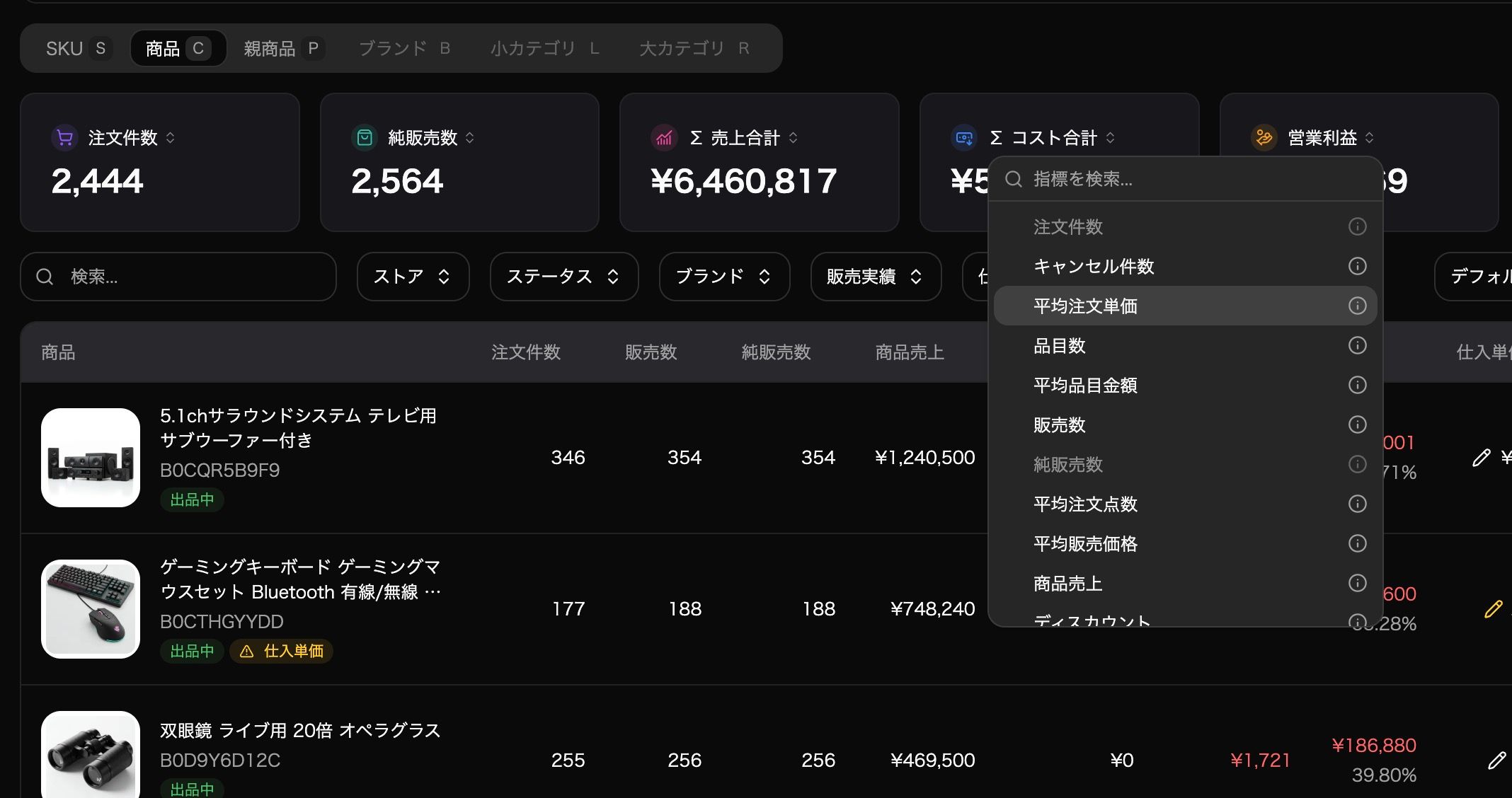
Summary Card Metric Selection
You can now choose which metrics are displayed in the summary cards (total value cards) above your data tables.
Previously, each page showed a fixed set of 6 metrics. With this update, you can select the metrics that matter most to you and display their totals on any page.
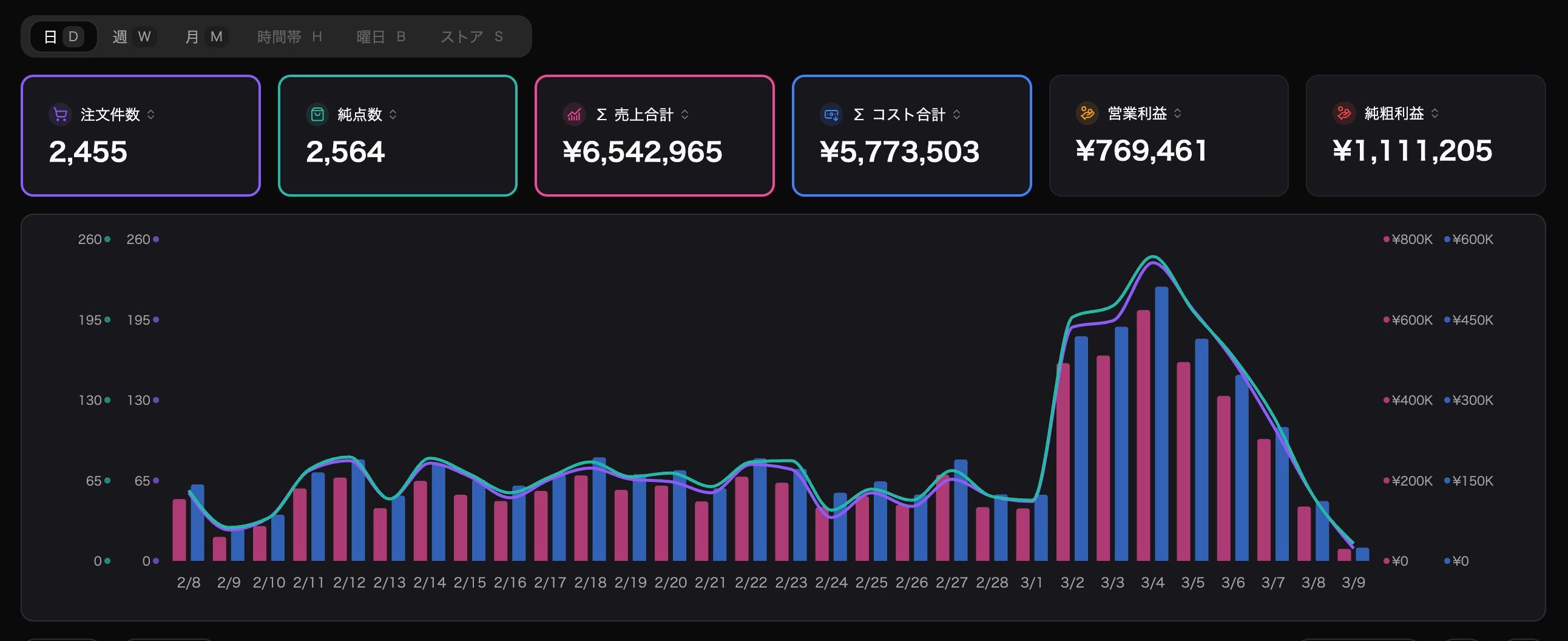
Graph Metric Customization
On the Performance, Product Performance, and Advertising Performance pages, you can now select up to 4 metrics to display on the time-series graphs (daily, weekly, and monthly views).
Previously, only sales data was available in graphs. Now you can add any metric and visualize the data you need for comparison and analysis.
Improvements
Mobile Display Fixes
We've fixed layout issues on mobile devices, making LISMOA easier to use on your smartphone. Give it a try!
Coming Soon
Some metrics, such as TACOS and profit margin, are currently being prepared for summary cards and graphs. These will be available shortly
Full mobile optimization for the summary card and graph customization features is also planned for an upcoming update
If you have any questions, please don't hesitate to contact our support team. Thank you for choosing LISMOA.
March 2nd, 2026
Improved
Thank you for using LISMOA.
We're excited to announce the addition of a usage-based billing option for order volume.
Background
Previously, when your monthly order count reached your plan's limit, order data retrieval would stop. The only way to resume within the same month was to upgrade your plan — which meant paying a higher rate the following month as well. This was especially inconvenient for sellers who only occasionally exceeded their limit.
Based on your feedback, we've introduced a usage-based billing option that lets you continue retrieving orders beyond your plan's limit without upgrading.
How It Works
When enabled, usage-based billing allows you to continue retrieving order data after reaching your monthly limit, at a per-order fee.
This option is off by default — no additional charges will occur unless you turn it on
You can toggle it on or off anytime from Settings > Plan
Per-Order Rates by Plan
Billing Details
Your monthly plan fee continues to be charged in advance as before
Usage-based charges are calculated at the end of the month and billed in arrears
Your payment will include: next month's plan fee + current month's usage-based charges
How to Enable
Log in to LISMOA
Go to Settings > Plan
Turn on the usage-based billing option
For more details, please refer to our help article: 注文件数の従量課金について .
If you have any questions, please don't hesitate to contact our support team. Thank you for choosing LISMOA.
February 19th, 2026
Improved
Thank you for using LISMOA.
We are pleased to announce that the data reference period for order data and advertising performance data on the Standard Plan has been extended from 12 months (1 year) to 24 months (2 years).
What's New
With this update, Standard Plan users can now perform year-over-year (YoY) comparisons. This enhancement was made possible through improvements to our API and overall platform performance.
Please note that data reference periods for other plans remain unchanged.
Important Note on Data Accumulation
When you first connect your account, LISMOA retrieves up to 6 months of historical data. This means it will take approximately 1.5 years from account creation to accumulate a full 2 years of data.
Introducing the "Historical Data Retrieval Option"
For users who want immediate access to past data, we have launched the "Historical Data Retrieval Option", which allows retrieval of up to 2 years of historical data.
Here's how it works:
Contact our support team
Receive a quote and complete payment
We retrieve your historical data (up to 2 years)
*Please note that there are some limitations on the types of data that can be retrieved. For details, please refer to 過去データ取得オプション .
Background
This update was driven by feedback from our users requesting the ability to view year-over-year comparisons. We will continue to improve our services based on your input. If you have any requests or suggestions, please feel free to share them on our Feedback page.
If you have any questions, please don't hesitate to contact our support team. Thank you for your continued support of LISMOA.
February 10th, 2026
Improved
Thank you for using LISMOA.
Overview
Due to an internal system update, cost-related data may temporarily display incorrectly.
Affected Period
February 10, 2025 (Mon) – approximately 2–3 days
Affected Data
This update involves re-fetching transaction data. As a result, the following pages will primarily be affected:
Advertising-related data will not be affected.
Important Note During This Period
Since cost-related data may temporarily show inaccurate values, we recommend performing CSV exports after the data re-fetch is complete.
Completion Notice
All data will return to normal once the re-fetch is complete, so please rest assured. We will notify you again once the process is finished.
This update is part of our ongoing efforts to improve LISMOA. We apologize for any inconvenience and appreciate your understanding.
If you have any questions, please feel free to contact our support team.