December 20th, 2025
New
Released CSV Bulk Import Feature for Product Data
We have released a CSV import feature that allows you to bulk update product data.
How to Use
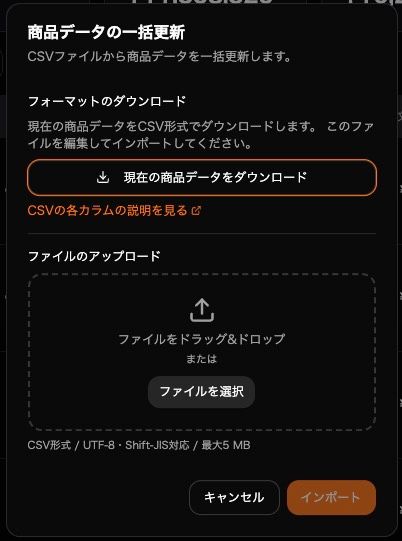
Download your current product data in CSV format from the Products page
Enter the cost price and shipping cost (for FBM) for each product in the downloaded CSV file
Save the file in the same format and upload it
This allows you to bulk update default cost settings (cost price and shipping cost) for your products.
For instructions on how to edit the CSV file, please refer to this help page.
Option to Apply to Past Orders
Since the update targets product master data, it does not normally affect sales or profit data. However, if you turn on the "Apply to past orders" option, you can also bulk apply the cost price and shipping cost to past orders.
Checking Import History
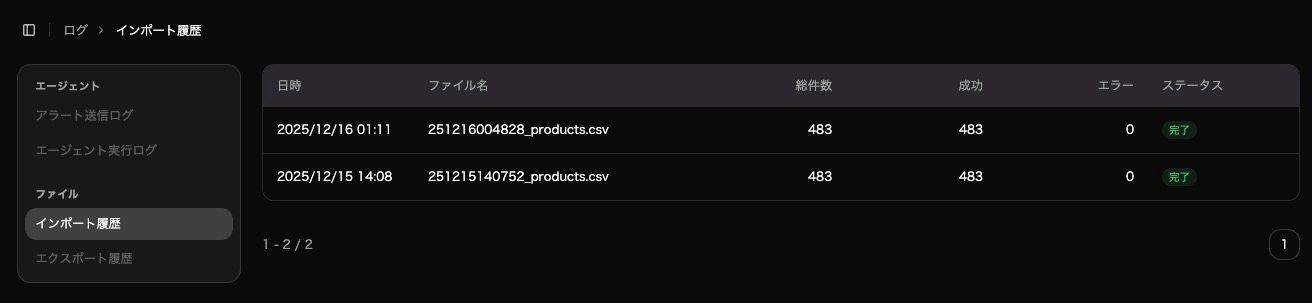
You can check the status of imported files at any time from the Import History page. If you have a large number of products or orders, the update may take some time.
With this feature, sellers with a large number of products can now set up cost prices with minimal effort. We hope you find it useful.